
 WebGIS UFPR CampusMap mobile first proposition
Abstract:
UFPR CampusMap (UCM) is a web-based Geographic Information System (WebGIS) that provides information about the campuses of the Federal University of Paraná, both indoors and outdoors. Previous research revealed that the user experience when using UCM on mobile devices is not satisfactory. To address this gap, this research proposes a version of UCM’s interface, specially designed for mobile devices, following the mobile-first concept. The methodology used followed an iterative and cyclical process of requirements engineering combined with the design thinking approach to problem-solving. This methodological strategy enabled the efficient use of time and resources, while actively engaging key stakeholders throughout the process, including both system developers and end users. The obtained results include a requirement document that details the functional and nonfunctional requirements of the system, as well as a high-fidelity prototype of the system interface. This study highlights the significance of applying mobile-first design in a WebGIS context, laying the groundwork for future usability testing and improved user satisfaction.
Keywords:
Mobile-first; Requirements engineering; Interface prototype; Maps
1. Introduction
According to Statcounter Global Stats (2022), global internet access via mobile devices has surpassed desktop usage since December 2020. By the end of 2023, 58% of the global population was utilizing mobile internet, amounting to 4.7 billion individuals (GSMA 2024). As mobile device usage continues to increase, map viewing has become more prevalent through these devices compared to other platforms and formats. However, many cartographic products are not typically designed to meet user expectations on mobile platforms. Web-based interactive maps are generally not designed to cater specifically to mobile devices (Roth 2019).
When designing for mobile first, i.e., using the Mobile First concept proposed by Wroblewski in 2009, developers need to prioritize the most important data and content, consequently simplifying access to the tasks users aim to perform. Wroblewski (2011) identified three primary reasons why web applications need to be designed for mobile devices first: the growing prevalence of web access through mobile phones; the need to focus only on essential data and actions due to the limited screen size; and the unique resources and sensors in mobile devices, allowing the development of context-aware applications. According to Roth (2019), Mobile First is related to user experience (UX), optimizing the technological limitations of mobile devices, such as small viewing screens, restricted storage capacity, limited memory, connectivity, reduced bandwidth, and shorter lifecycle. Therefore, this concept first considers a more constrained user experience and then adapts it for more flexible use cases. The term UX refers to the overall experience related to the user’s perception, reaction, and behavior when interacting with a system (Joo 2017).
Advancements in mobile devices have been equipped them with sensors and services that can enhance their functional potential in map visualization. For example, smartphones commonly feature accelerometers, gyroscopes, magnetometers, GPS, and biometric sensors, among others (Nield 2020). Abraham (2019) highlights that mobile maps enable unique digital interactivity, differently from other mapping media due to the touch-based interactions and feedback mechanisms such as haptic responses and vibration. The inherent mobility of cell phones and tablets increases the interactive potential of these sensors (Horak et al. 2021).
Designing for mobile use is not only about fitting content on a small screen, but also about exploiting these mobile-specific opportunities to enable more pervasive spatial interaction. These considerations are particularly relevant in the context of web cartography and WebGIS. Web cartography refers to the visualization and interaction with spatial information through web browsers (Prina & Trentin, 2021), whereas a WebGIS represents a more comprehensive system that also enables data querying and manipulation over the internet (Da Silva, 2013).
Building upon these definitions, the UFPR CampusMap (UCM - www.campusmap.ufpr.br) is a WebGIS (Web Geographical Information System) that provides both external and internal information about the UFPR campuses, aiming to assist users in locating and interacting with university resources through an updated campus database (Martins 2021). Developed by the UFPR Center for Applied Research in Geoinformation (CEPAG- www.cepag.ufpr.br) (Lima 2020), the UCM has been tested for effectiveness, efficiency, and user satisfaction. These evaluations revealed that users experience more difficulty interacting with the system on mobile devices compared to desktop devices (Martins 2021). Thus, considering that the mobile version of UCM was not being specifically designed for such device, potentially compromising user experience. Therefore, this study aims to propose an optimized version, developed primarily for mobile devices, addressing both functional and non-functional requirements necessary for the application while considering the unique features and limitations of these devices. Additionally, it outlines a methodology for achieving this objective.
2. Methodology
The methodology adopted in this study is structured into three sequential and interdependent steps (Figure 1). This methodological process aligns with the cyclical and iterative flow of requirements engineering, which helps the identification and fulfillment of user requirements (Eva 2001) while enhancing their quality (Baszuro and Swacha 2020). Each step results in one or more deliverables that support the subsequent step, with each deliverable being updatable as needed. In addition to adhering to the proposed requirements engineering flow, the methodology incorporates elements and methods from user experience (UX) design and the design thinking phases. Design thinking is a practical, user-centered approach characterized by six distinct phases: empathize, define, ideate, prototype, test, and materialize (Gibbons 2016). According to Valentim, Silva and Conte (2017) and Kryvorucha et al. (2020), the use of design thinking in application development contributes to more creative and innovative solutions. Given that this research focuses on proposing the system rather than its implementation, only the first four phases of design thinking were adapted and incorporated into the methodology.
The first step (1) consists of requirements elicitation and analysis, using techniques such as requirements reuse and brainstorming. This first phase results in the creation of proto-personas as its primary deliverable. The second step (2) concerns the specification of requirements, resulting in three deliverables: user stories, use case diagrams, and a requirements document. Among these, the requirements document is primary deliverable, while the others help to create both functional and non-functional system requirements for this document. The third step (3) is dedicated to requirements validation, for which prototyping was selected as the method, which is, a high-fidelity interactive system interface, aligned with the principles of requirements engineering.

2.1 Elicitation and analysis of requirements
In this research, requirements elicitation was conducted using two primary methods: requirements reuse and brainstorming. The first deliverable generated to support subsequent stages was the development of proto-personas.
Requirements reuse
During the development of UCM, Lima (2020) compiled the system requirements and designed a desktop focused version that also supported mobile devices through responsive design. Subsequently, Martins (2021) evaluated the system’s usability on desktop and mobile devices, employing heuristic evaluation criteria, usability testing, and ergonomics. This evaluation led to the identification of potential improvements for the UCM system. Based on the analysis of these suggested improvements, alongside the ongoing evolution of the current system, some requirements were reused in the present study.
Brainstorming
Two brainstorming sessions were conducted, each involving different participant groups. The first session included seven participants, comprising interns and professors from the UFPR Center for Applied Research in Geoinformation (CEPAG). The second session adopted a hybrid format, featuring both online and in-person participation, and included two master’s and doctoral researchers from the Graduate Program in Geodetic Sciences. Both sessions were guided by a structured approach and began with an initial slide presentation designed to contextualize participants and clarify the current session’s purpose.
Proto-personas
Based on the insights obtained during the brainstorming sessions, proto-personas were created. Proto-personas are simplified representations of user profiles, created based on the expertise and knowledge of stakeholders participating in the sessions (Cooper et al. 2014). As pointed out by Hampshire, Califano, and Spinks (2022), proto-personas provide alignment, shared understanding, and empathy towards the product’s users. Additionally, they facilitate the identification and mapping of potential problems and solutions related to the tool under development (Wibawa and Wiryana 2018).
During the brainstorming sessions, participants reflected on possible user profiles, considering that users affiliated with the university (students and staff) would be more likely to use the system due to their regular presence on campus, while users without institutional ties were expected to use the tool less frequently. Despite this difference in user behavior, the planned functionalities have to address the need of all types of users similarly.
The use of proto-personas enabled the development of ideas tailored to different user profiles and evaluated how the system could efficiently meet their needs. To visually represent each proto-persona, images were generated using the online resource “This Person Does Not Exist” (https://thispersondoesnotexist.com/), ensuring that all representations were entirely fictional. Proto-personas are particularly useful in the early stages of design thinking, such as “empathy” and “definition” phases, as they allow the participants to better understand and address the perspectives of potential users.
2.2 Specification and documentation of requirements
User story
The insights obtained during the brainstorming sessions contributed to the creation of user stories. During these sessions, participants were encouraged to reflect on the different user profiles that interact with the system, as well as potential users, considering aspects such as their needs and motivations. These user stories were structured to organize and detail their needs and motivations. User stories are a critical tool for eliminating unnecessary interactions and focusing on what users truly need (Cooper et al. 2014). The format used for writing user stories adhered to the following structure: As a ___, I want ___ so that ___.
Use case diagram
The use case diagram was developed using the Figma design tool. The system’s primary actors were defined as: users, registered users, and administrators. Each ballon was filled with an actor’s action according to the system’s functional requirements.
Requirement documentation
The specification and documentation of requirements followed the structure of the requirements document model proposed by Sommerville (2011), with adaptations made to suit the project’s needs. The structure of the requirements document created for the system is outlined in Table 1. This approach ensured that both functional and non-functional requirements were systematically recorded and could be iteratively refined as necessary.
2.3 Validation of requirements
Prototyping
In this study, a high-fidelity interface prototype was developed using the Figma design tool. Figma enables the integration of interactive elements into the prototype, allowing for a simulation that closely resembles the real user experience. Before constructing the high-fidelity interface prototype, low-fidelity prototypes were developed based on ideas generated during the brainstorming sessions. The use of low-fidelity prototypes was a strategic decision, as they facilitated quick adjustments due that these prototypes require less time to modify.
The low-fidelity prototypes were presented to UCM users through an online form that included a voting mechanism to select the most suitable prototype idea. The interface proposals were displayed to participants through the form in two stages. In the first one, the prototypes were presented without any explanatory context, while in the second stage, each proposal was accompanied by a detailed explanation. To encourage participants to provide suggestions for refining the proposals, the form included both closed and open-ended questions. Although participants were given the option to submit their own low-fidelity prototypes, none chose to do so. However, participants provided explanations for rejecting other alternatives and highlighted specific issues they encountered.
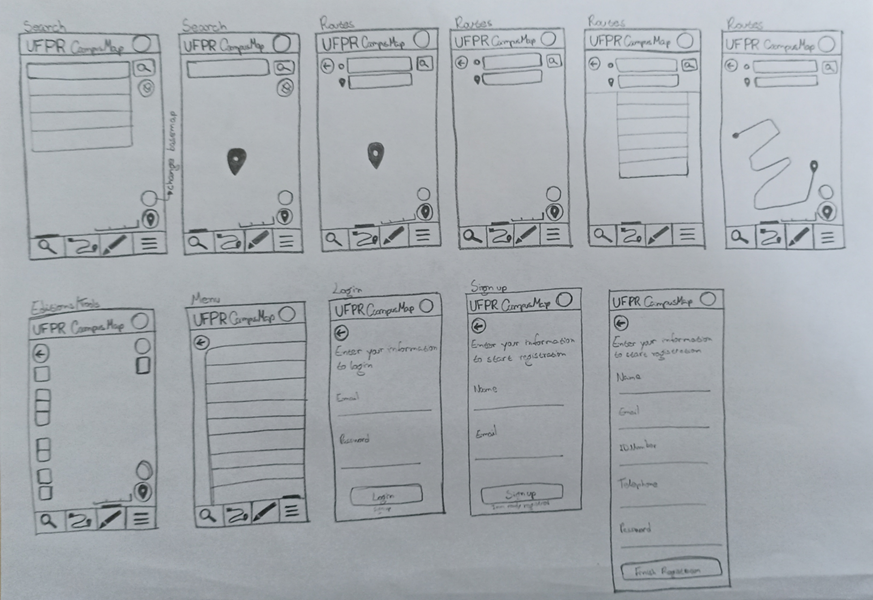
Based on the feedback received and the most voted low-fidelity prototype, additional sketches for the remaining interface pages were developed to create a high-fidelity prototype. These initial sketches, also known as wireframes, were made with pencil and paper to allow quick and straightforward visualizations of the system’s main screens. Subsequently, each screen was refined and recreated in Figma, incorporating as many detailed elements as possible, such as buttons, maps, and textual content. Figma also enabled the creation of interactive transitions between screens, achieving a high-fidelity interface prototype level. Some interactions, such as zooming functionalities and certain editing tools, could not be simulated within the prototype.
3. Results
The results presented in this section include: requirements reuse, brainstorming session outcomes, proto-personas, user stories, use case diagram, requirements document, and the interface prototype.
Requirement reuse
The requirements reuse in this study were based on the specifications presented by Lima (2020) and Martins (2021). Table 2 outlines the requirements proposed in this study.
Brainstorming
In the brainstorming sessions, it was identified that the system would cater different types of users including university students, staff, service providers and members of the external community who benefit from university services. These user groups were classified as either internal and external users, based on their frequency of visits to the university campuses. Internal users, such as students and staff, are regular campus visitors, whereas external users, such as service providers or community members, interact with the system less frequently. From this analysis, it was possible to create the proto-personas.
Beyond identifying functional and non-functional requirements of the system, the brainstorming sessions also highlighted several key considerations and challenges. These included: how functionalities would be presented in the interface; the potential removal of buttons that could be replaced by touch commands on mobile device screens; methods for providing additional information on bus routes connecting different campuses; details about services offered to the community and occasional events; and layout ideas for the system’s main interface.
Proto-personas
Figure 2 presents the proto-personas developed based on insights from the brainstorming sessions. These are categorized according to their frequency of campus visits. Proto-personas served as a foundational tool for empathizing with and addressing the diverse needs of the system’s users.

User stories
The user stories derived from the brainstorming sessions are summarized in Table 3. Based on the user stories, it was possible to identify the key functionalities required to meet users’ needs, which include search, user location, and route navigation. In Table 3, L refers to location, S refers to search, and R to route. Internal users, who visit the university more frequently, and external users, who visit sporadically, were both accounted for in the development of these user stories.
Use case diagram
The use case diagram identifies three main actors: users, registered users, and administrators. Actions associated with each actor are represented using yellow balloons. Figure 3 provides a visual representation of the use case diagram, outlining user interactions.

Requirements document
The requirements documents were developed iteratively, as the interface prototype was developed, integrating inputs from the brainstorming sessions and previously reused requirements. Each requirement was systematically described along with its dependencies. Dependencies indicate the prerequisite requirements necessary for successful implementation. Examples of functional and non-functional requirement specifications are presented in Tables 4 and 5, respectively.
Table 6 presents a list of non-functional requirements. Table 7 presents a list of functional requirements.
Prototype
The development of the high-fidelity interface prototype began with the creation of wireframe options for the system’s home screen. To ensure user involvement in the design process, an online form was created, allowing participants to vote for the most suitable wireframe proposal. The form was delivered in two stages: 1) In the first stage, four distinct wireframe proposals were presented without additional context or explanation; 2) In the second stage, the same proposals were reintroduced, accompanied by explanatory text detailing the development rationale for each design.
Based on participants votes and feedback, a preferred wireframe was selected and with the considerations made by the participants who responded to the form, it was possible to create a wireframe for the other system screens, enabling the creation of the prototype. The results from both stages provided valuable insights into participant preferences and reasoning. Figure 4 illustrates the wireframe proposals evaluated during the form process.

Fourteen participants responded to the form, five of whom had attended the brainstorming session. Participants were asked to identify the most appropriate wireframe among the four presented. In both stages of the form, - with and without an explanation of the wireframe proposal - Prototype 3 emerged as the preferred option. Since the results were consistent across both stages, it can be concluded that providing a justification for each prototype did not significantly influence participants’ choice. Participants were also asked to justify why the remaining wireframes were considered inadequate. Tables 8 and 9 summarize the reasons provided by participants for selecting Prototype 3. In the form, the wireframes were referred to as low-fidelity prototypes, which is reflected in the participant’s responses.
Figure 5 presents the initial wireframe, which was hand-drawn using a pencil to facilitate a quick and straightforward conceptualization of the system’s main interface.

Figure 6 shows the screens of the high-fidelity prototype, developed using the Figma design tool. The project at Figma can be accessed at the following link: https://www.figma.com/file/xkqDmhIROnrzKYgz5Owzq7/UCM-Mobile-First-English?type=design&node-id=0-1&mode=design&t=ycf6gWdoGY8osvh6-0. The interactive version of the prototype is available at: https://www.figma.com/proto/QbIVl9gmJOD47vnx7ZuNBl/UCM-interativo-English?type=design&node-id=6-27&t=Mn9z4cCpB7ECN6mR-0&scaling=scale-down&page-id=0%3A1&starting-point-node-id=6%3A27.

The requirements engineering process cycle served as the methodological foundation for proposing the UCM mobile-first solution. However, the subsequent design thinking stages, implementation and user testing, still need to be addressed. To validate whether the proposed solution enhances the application’s usability, the same usability tests applied by Martins (2021) should be conducted. Once these stages are completed, it is anticipated that the findings from user tests will inform further refinements to the prototype and requirements document. These iterative changes will ensure the system more effectively meets user needs and expectations.
4. Discussion
The findings of this research demonstrate the value of applying a mobile-first, user-centered approach to a geospatial application, but they also revealed challenges and lessons learned during the process. First, the methodology adopted in this research is recommended for similar WebGIS projects; however, certain modifications should be considered to further optimize the approach.
While requirements reuse can be an effective strategy for adapting systems to different types of devices, it may also introduce challenges. Reusing requirements originally designed for another platform risks including specifications that are unsuitable for the target device. Reusing requirements from the desktop version of UCM saved time and ensured continuity, but some desktop-oriented specifications proved unsuitable for mobile devices. For example, features that worked well on large screens had to be simplified for smartphone use. This underscores a general point: when porting a GIS application to mobile, one should not blindly carry over all existing requirements. Without critical filtering, there is a risk of including functions that don’t translate well to the new context, which can undermine the very goal of optimization. As a result, the benefits of project optimization may be undermined by a failure to fully address user needs. Thus, a balance is needed between reuse and reevaluation, to confirm it aligns with mobile users’ needs and constraints.
When consulting users to identify their expectations and needs, it is essential to conduct a thorough, professional analysis of their feedback. User-proposed solutions should not be accepted uncritically, it is necessary to evaluate the proposals before considering them (Cooper et al. 2014). Users readily shared their desires and pain points, which can lead to useful improvements; however, user-proposed solutions often mirrored familiar applications rather than targeting the core problem and actual needs. For example, in this study, several users suggested features already present in commercial applications designed for general use, such as Google Maps. This serves as a reminder that user involvement must be coupled with expert analysis: user feedback guides design, but shouldn’t uncritically dictate it. While such feedback can provide useful insights, it must be carefully evaluated to ensure that proposed solutions align with the specific goals and constraints of the project.
The use of proto-personas in this study proved to be an efficient tool for conceptualizing user needs, as it facilitated the rapid identification of functional requirements. However, because proto-personas are hypothesis-driven (based on the team’s perceptions), they carry a risk: if the assumptions were off, some design decisions might not fully match real user behavior. In an ideal scenario, they would have been validated through direct research, like surveys or interviews with actual representatives of each user group. Ethical guidelines for conducting experiments with human subjects require significant time and preparation, which limited the feasibility of this validation process within the scope of the study. Nevertheless, the proto-personas developed were sufficiently robust to support the proposition, as they were informed by insights from potential users who participated in the brainstorming sessions and responded to the wireframe evaluation form.
5. Final considerations
To overcome the usability limitations identified by Martins (2021) concerning the UFPR CampusMap system on mobile devices, this study proposed a new version of the system built on a mobile-first design strategy. This approach prioritizes the design of applications for mobile devices by accounting for their inherent limitations and available resources. The proposed solution included the development of a comprehensive requirements document and an interactive, high-fidelity interface prototype for the campus map system, guided by user-centered design principles. The methodology combined elements of design thinking, agile methods (e.g., user stories) and UX design deliverables (e.g., wireframes, diagrams, proto-personas, and high-fidelity interface prototypes) within the engineering process requirements. Throughout the process, the primary objective was to enhance user satisfaction for mobile device users of the UCM system, which guided the methodological choices and design decisions adopted in the study.
The prototyping tools employed contributed to the efficient allocation of time and resources necessary for achieving research objectives. Initial wireframes were developed using simple resources such as pencil and paper, which allowed for rapid ideation and modifications prior to creating the final prototype. The Figma design tool facilitated the development of a high fidelity, interactive prototype, enabling realistic interaction simulations and easing the transition to front-end development by ensuring compatibility with development languages. The final prototype not only offers a clear vision for developers, but it also serves as a communication artifact to demonstrate the proposed solution to stakeholders.
The methodology, which integrates cyclical and iterative approaches, allowed for continuous optimization of the proposed solution. This flexibility ensures that both research outputs, the requirements document and the high-fidelity interface prototype, can be further refined in future studies. As recommended by Arnowitz, Arent and Berger (2007) and applied by Martins (2021), the next step should include usability testing to validate and enhance the prototype’s performance.
The development of a mobile-first solution tailored to a specific use case, as presented in this study, enables users to more easily adopt applications that meet their contextual information and navigation needs effectively. This is particularly important when compared to general-purpose, commercial applications that may not align with user requirements within a specific environment, such as a university campus. This demonstrates the broader point that domain-specific WebGIS solutions, when designed with a specific targeted user group, may offer greater effectiveness than generic alternatives in specialized contexts. Once implemented, the new CampusMap is expected to significantly enhance the way users engage with geospatial information on campus, facilitating tasks such as locating nearby facilities and discovering available services, ultimately improving daily operational efficiency and overall user satisfaction.
In conclusion, this study contributes a structured case of integrating geospatial systems with contemporary UX design through a mobile-first approach applied to a WebGIS. The results indicate that this strategy can improve the usability and user satisfaction of spatial applications developed for mobile devices. Central to this contribution is the proposed methodology, which integrates Design Thinking phases into the requirements engineering process, forming a cyclical and iterative framework that supports continuous refinement. The approach was marked by the active involvement of both specialists and end users, who provided insights and feedback at key stages of development. This collaborative process enabled the creation of a high-fidelity prototype, serving as an efficient and cost-effective tool for validating interface solutions. To support future adoption of this methodology, critical aspects should be observed, particularly the reuse of requirements from systems on different platforms, the strategic use of proto-personas, and the systematic incorporation of user feedback throughout the design cycle.
Future research directions based on this study include: 1) Conducting usability tests with real users to validate and improve the prototype before full implementation; 2) Developing a responsive design to accommodate a range of mobile devices, including flexible and foldable screens; 3) Prototyping a desktop version of the system following the mobile-first approach and comparing it with a desktop-first design to validate the hypothesis that mobile-first designs lead to better desktop interfaces.
ACKNOWLEDGEMENT
We extend our thanks for the financial support from the National Council for Scientific and Technological Development (CNPq) - Process 310312/2017-5, 422979/2021-0 and 307789/2023-3 and the Coordination of Improvement of Higher Education Personnel - Brazil (CAPES) - Finance Code 612795/2021-00.
REFERENCES
- Abraham, L. (2019). Where do we go from here? Understanding mobile map design PhD. University of Wisconsin.
- Arnowitz, J., Arent, M., and Berger, N. (2007). Validate and Iterate the Prototype. In: M. Kaufmann. ed. 2007. Effective Prototyping for Software Makers. San Francisco: Morgan Kaufmann. Ch. 12.
- Baszuro, P., and Swacha, J. (2020). Requirement engineering as a software development process. In Data-Centric Business and Applications: Towards Software Development (Vol. 4). Springer Cham, pp.21-39.
- Cooper, A. et al. (2014) About face: the essentials of interaction design 4th ed. John Wiley & Sons.
- Eva, M. (2001). Requirements acquisition for rapid applications development. Information & Management, 39(2), pp.101-107.
-
Gibbons, S. (2016). Design Thinking 101 NNGROUP. Available at:<Available at:https://www.nngroup.com/articles/design-thinking/ > [Accessed: 1 July 2024].
» https://www.nngroup.com/articles/design-thinking/ -
Statcounter Global Stats. (2022). Desktop vs mobile vs tablet market share worldwide Available at: <Available at: http://gs.statcounter.com/platform-market-share/desktop-mobile-tablet > [Accessed 16 November 2021].
» http://gs.statcounter.com/platform-market-share/desktop-mobile-tablet -
GSMA (2024). The Mobile Economy 2024 Available at: <Available at: https://www.gsma.com/solutions-and-impact/connectivity-for-good/mobile-economy/wp-content/uploads/2024/02/260224-The-Mobile-Economy-2024.pdf > [Accessed: 14 December 2024].
» https://www.gsma.com/solutions-and-impact/connectivity-for-good/mobile-economy/wp-content/uploads/2024/02/260224-The-Mobile-Economy-2024.pdf - Hampshire, N., Califano, G., and Spinks, D. (2022). Mastering Collaboration in a Product Team Apress.
- Horak, T., Aigner, W., Brehmer, M., Joshi, A., and Tominski, C. (2021). Responsive visualization design for mobile devices. In: Mobile Data Visualization. Chapman and Hall/CRC Ch. 2. pp. 33-66
- Joo, H. S. (2017). A Study on the development of experts according to UI / UX understanding of design according to user interface change. International Journal of Applied Engineering Research 20(12), pp. 9931-9935.
- Lima, M. D. C. (2020). Desenvolvimento de um WebGIS para campus universitário com práticas de UCD Master’s thesis. Federal University of Paraná.
- Martins, V. E. (2021). Avaliação de usabilidade e ergonomia do webgis UFPR Campus Map (UCM) acessado em dispositivos desktop e móvel Master’s thesis. Federal University of Paraná.
-
Nield, D. (2020) ‘Conheça todos os sensores do seu smartphone e como eles funcionam’. Gizmodo Brasil Available at: <Available at: https://gizmodo.uol.com.br/sensores-smartphones-guia/ > [Accessed: 16 January 2023].
» https://gizmodo.uol.com.br/sensores-smartphones-guia/ - Roth, R. (2019). What is mobile first cartographic design. In ICA Joint Workshop on User Experience Design for Mobile Cartography Bern, Switzerland: International Cartographic Association.
- Sommerville, I. (2011). Software Engineering 9th ed. Translated by Ivan Bosnic, G. Kalinka and O. Gonçalves. São Paulo: Pearson Prentice Hall.
- Valentim, N. M. C., Silva, W., and Conte, T. (2017). The students’ perspectives on applying design thinking for the design of mobile applications. In 2017 IEEE/ACM 39th International Conference on Software Engineering: Software Engineering Education and Training Track (ICSE-SEET), pp. 77-86. IEEE.
- Wibawa, M. B., and Wiryana, I. M. (2018). The Enrichment Methods Viewpoint Oriented Requirements Definition (VORD) with the Capability Model Integration (CMMI) and Proto Personas Methods for Needs Analysis. In Journal of Physics: Conference Series, 1019(1), p. 012072. IOP Publishing.
- Wroblewski, L. (2011). Mobile first: Foreword by Jeffrey Zeldman New York: A Book Apart.

 Source: The authors (2025).
 Source: The authors (2025).
 Source: The authors (2025).
 Source: The authors (2025).
 Source: The authors (2025).
 Source: The authors (2025).